The AI Article Writer: Generate Engaging Content Effortlessly
Overcome writer's block and produce high-quality articles with an AI article writer. Explore how this technology streamlines content creation for businesses and individuals.
10 min read · September 4, 2026
The sheer volume of content required to maintain an online presence can be overwhelming. Bloggers, content marketers, small business owners, and freelance writers often find themselves battling writer's block, struggling to meet deadlines, and ultimately limiting their output. The constant demand for fresh, engaging articles consumes significant time and effort, creating a bottleneck in content production.
What is an AI Article Writer?
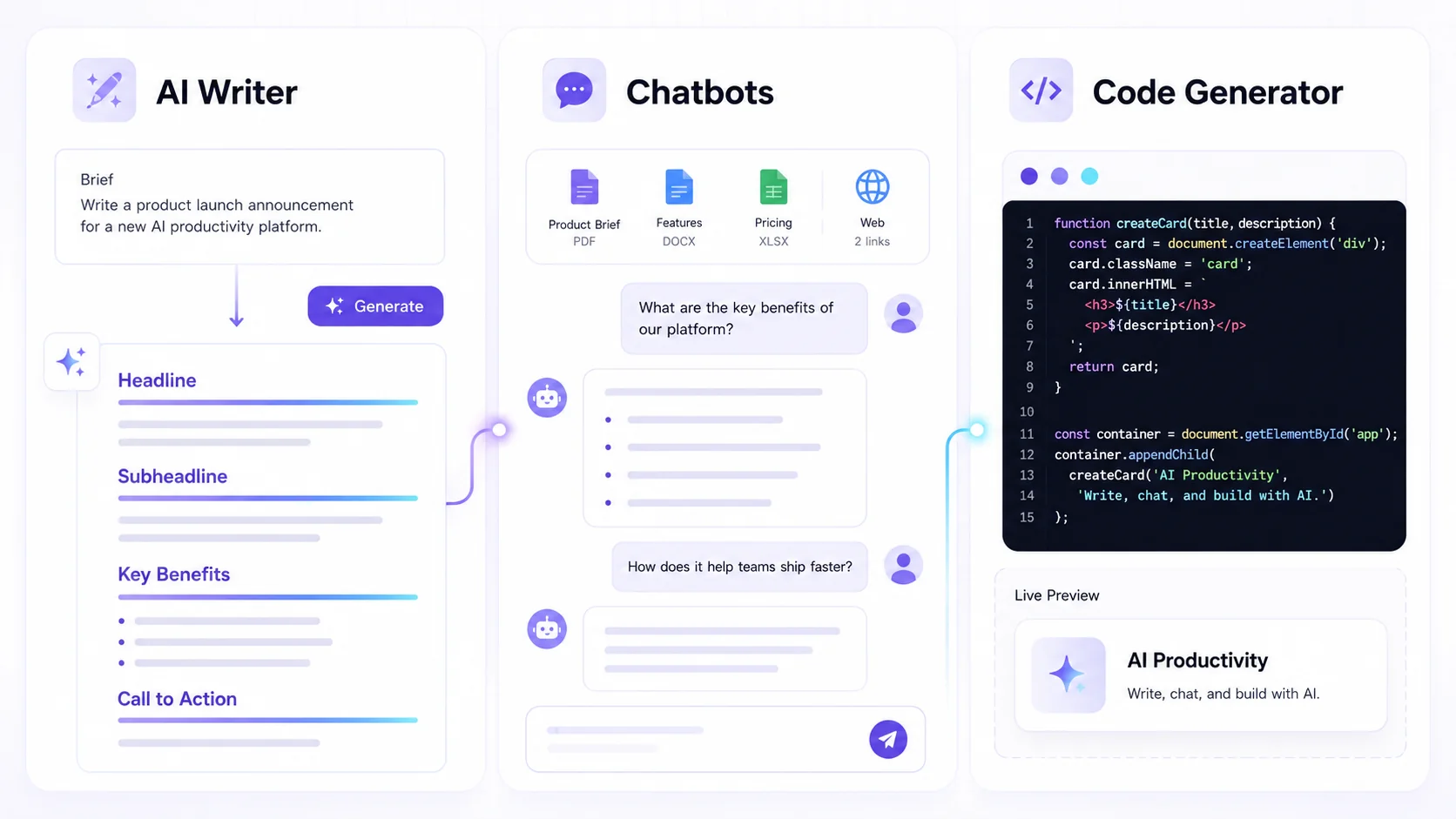
An AI article writer is a sophisticated software tool that uses artificial intelligence, specifically natural language processing and generation models, to create written content. At its core, it takes your input - a topic, keywords, a brief outline, or even just a few sentences - and generates a coherent, human-like article. These tools are designed to understand context, structure, and tone, producing drafts that can range from short blog posts to more in-depth articles. You can interact with these tools through a prompt-based interface, guiding the AI to produce content tailored to your specific needs. Textalky offers an advanced AI Writer tool as part of its comprehensive creative studio.
Why Use an AI Article Writer?
The benefits of integrating an AI article writer into your content creation process are substantial and directly address the common pain points faced by content creators.
- Overcoming Writer's Block: One of the most frustrating aspects of content creation is staring at a blank page with no ideas. AI writers can provide a starting point, generate outlines, or even draft entire sections, helping you push past creative hurdles. This is invaluable for maintaining momentum and ensuring you have content ready when inspiration is low. Discover more on overcoming writer's block with AI assistance.
- Saving Time and Increasing Output: The ability to generate content at speed is a primary advantage. What might take a human writer hours to research and draft can be produced by an AI in minutes. This allows you to significantly scale your content production, publish more frequently, and cover a wider range of topics without a proportional increase in your workload.
- Maintaining Consistency: AI writers can adhere to specific tones, styles, and formats consistently across multiple pieces of content. This is crucial for brand building and ensuring your audience receives a predictable and reliable content experience. Whether you need a formal, informative tone or a more casual, engaging one, the AI can be guided to maintain it.
- Enhancing Research and Idea Generation: While AI writers generate text, they also function as powerful research assistants. By prompting them with a topic, you can quickly gather information, identify sub-topics, and explore different angles that you might not have considered, enriching the depth and breadth of your articles.
- Cost-Effectiveness: For businesses and freelancers operating on a budget, AI writers can offer a more affordable way to increase content output compared to hiring additional writers, especially for high-volume needs.
Beyond Just Writing: The All-in-One Advantage
The true power of an AI article writer is amplified when it's part of a unified creative ecosystem. Many AI tools operate in silos, requiring separate subscriptions and integrations. This fragmented approach can lead to inefficiencies and increased costs. An all-in-one AI creative studio, however, brings together diverse AI functionalities under a single interface and subscription.
Imagine drafting an article with an AI writer, then immediately using AI voiceovers to create a podcast version or an audio summary. You could then generate custom AI images to illustrate your points, or even create short video snippets to promote the article on social media. This seamless integration means you're not just getting an AI article writer; you're accessing a complete suite of creative tools designed to work together. This all-in-one advantage streamlines your entire content workflow, from ideation to final distribution. Instead of managing multiple subscriptions for writing, voice, images, and video, you have one platform that handles it all.
Choosing the Right AI Article Writer for You
When selecting an AI article writer, consider the following factors to ensure it meets your needs:
- Quality of Output: The most critical factor is the quality of the generated text. Look for tools that produce coherent, grammatically correct, and contextually relevant content. Features like custom templates and smart editing can further refine the output.
- Ease of Use: An intuitive interface is crucial, especially for those new to AI writing. The process of providing prompts and generating content should be straightforward and efficient.
- Integration Capabilities: As discussed, the ability to integrate with other creative tools is a significant advantage. An all-in-one studio offers the most streamlined experience, allowing for cross-functional content creation without leaving the platform.
- Customization and Control: The best AI writers allow for a degree of customization. This can include specifying tone, style, target audience, and keywords, giving you more control over the final output.
- Versatility of Features: Beyond basic article generation, consider if the tool offers features like AI rewriting, blog post wizards, or custom template creation to support a wider range of content needs.
- Support and Community: Access to support resources, tutorials, and a user community can be invaluable for learning best practices and troubleshooting issues.
Getting Started with Textalky's AI Writer
Textalky makes it exceptionally easy to begin generating articles with its AI Writer. The platform is designed for immediate usability, even for those with no prior experience with AI content creation.
- Sign Up or Log In: If you don't already have an account, you can sign up at lab.textalky.app/register. Existing users can log in to their dashboard.
- Access the AI Writer: Navigate to the "AI Content Suite" or a similar section within your Textalky dashboard and select the "AI Writer" tool.
- Craft Your Prompt: This is where you guide the AI. Be as specific as possible.
- Topic: Clearly state the subject of your article.
- Keywords: Include relevant keywords you want the AI to incorporate.
- Tone and Style: Specify if you need a formal, casual, professional, or conversational tone.
- Audience: Mention who the article is intended for (e.g., beginners, experts, general public).
- Outline (Optional but Recommended): Provide a structured outline with headings and subheadings. This gives the AI a clear roadmap.
- Word Count (Approximate): You can suggest a desired length.
- Example Prompt: "Write a blog post about the benefits of indoor plants for small apartments. Target audience: young professionals living in urban areas. Tone: friendly and informative. Include sections on air purification, mood enhancement, and low-maintenance options. Aim for around 800 words."
- Generate Content: Click the "Generate" button. The AI will process your prompt and produce an article draft.
- Review and Refine: Read through the generated content. You can edit it directly, ask the AI to rewrite specific sections, expand on points, or shorten paragraphs. Use the Smart Editor features to polish the text, check for grammar, and improve clarity.
- Save or Export: Once you're satisfied, you can save your work within Textalky or export it for use elsewhere.
Workflow Example: Let's say you need to write an article about "Sustainable Fashion Trends for 2024."
- Prompt: "Generate a blog post outline for 'Sustainable Fashion Trends for 2024'. Include sections on recycled materials, ethical production, circular fashion, and the rise of rental services. Target audience: environmentally conscious consumers. Tone: optimistic and educational."
- AI Output: A structured outline with suggested points for each section.
- Next Step: Feed this outline back into the AI Writer, perhaps asking it to "Write the section on recycled materials based on the provided outline points, focusing on innovation in textile recycling. Aim for 300 words."
- Refinement: Edit the generated text, add your personal insights, and use the AI ReWriter to rephrase sentences for better flow.
Maximizing Your Content Creation with Textalky
Textalky’s strength lies in its integrated approach. Once you have your AI-generated article, you can enhance it using the studio's other powerful tools:
- Add AI Voiceovers: Turn your written content into audio. This is perfect for creating podcast episodes, audio versions of blog posts for accessibility, or engaging social media clips. Textalky offers AI voiceovers in a wide range of languages and accents, with over 50 studio-grade voices to choose from. You can even clone your own voice for a truly unique brand presence.
- Generate Custom AI Images: Visuals are crucial for reader engagement. Use Textalky's AI Image tools to create unique header images, illustrations for specific points, or social media graphics that perfectly match your article's theme and tone. These AI images can be generated from simple text prompts, ensuring visual consistency across your content.
- Create Engaging Videos: Transform your articles into short promotional videos for social media or explainer videos using AI video generation tools.
- Improve Readability and SEO: Utilize the Smart Editor and AI ReWriter to refine your text, improve readability scores, and ensure your articles are optimized for search engines.
- Automate Publishing: With the WP Integration, you can publish your AI-generated and enhanced articles directly to your WordPress blog with just a few clicks.
By combining these tools, you create a powerful content flywheel. An article isn't just text; it's a multimedia asset that can be repurposed and amplified across different platforms, reaching a wider audience and deeper engagement.
Pricing and Plans: Affordable AI Content Creation
Understanding the value of an integrated AI studio means looking beyond the cost of individual tools. Stacking multiple subscriptions for AI writing, voice generation, image creation, and video editing can quickly become expensive and cumbersome. Textalky offers a clear and competitive pricing structure designed to provide maximum value.
Here are Textalky's current plans as of August 2026:
- AI Free - Month-to-month rate: $0 - Total price for one year: $0
- AI Basic - Month-to-month rate: $6 per month - Total price for one year: $59 for the year
- AI Explorer - Month-to-month rate: $12 per month - Total price for one year: $129 for the year
- AI Plus - Month-to-month rate: $29 per month - Total price for one year: $229 for the year
- AI Pro - Month-to-month rate: $79 per month - Total price for one year: $649 for the year
Each plan offers a different level of monthly quotas for writing words, voiceover characters, visual credits, and transcription minutes, along with access to an expanding set of AI tools. The AI Free plan is an excellent way to start, offering basic access to Textalky's capabilities without any cost.
For those looking for the ultimate value, Textalky offers a special promotion: AI Lifetime Pro, lifetime access for $79 once. This is a one-time payment that grants you access to every tool in the studio, including AI Writer, AI Voiceover, AI Images, AI Video, and more, with generous monthly quotas that reset every month. This offer is available for a limited time, providing an unparalleled opportunity to own a complete AI creative studio without ongoing subscription fees. You can find more details about this AI Lifetime Pro offer on its dedicated landing page.
When comparing AI solutions, consider the total cost of acquiring similar functionality through separate tools. Textalky's all-in-one approach consolidates these costs into a single, predictable subscription or a one-time lifetime payment, simplifying your budget and your workflow. For a detailed breakdown of features and quotas for each plan, please visit the pricing and plans page.
Frequently asked questions
What is an AI article writer and how does it work?
An AI article writer is a software tool that uses artificial intelligence, specifically large language models, to generate written content based on user prompts. You provide a topic, keywords, desired tone, and other parameters, and the AI uses its training data to construct an article. It analyzes your input, identifies patterns and relationships in language, and generates text that is coherent, grammatically sound, and relevant to your prompt.
Can an AI article writer replace a human writer?
While AI article writers are incredibly powerful tools for generating content quickly and efficiently, they are best viewed as assistants rather than replacements for human writers. AI can excel at tasks like overcoming writer's block, generating initial drafts, summarizing information, and producing high volumes of content. However, human writers bring unique qualities such as deep creativity, nuanced understanding of complex emotions, original thought leadership, subjective experience, and strategic brand voice. The most effective content creation often comes from a collaboration between human insight and AI efficiency.
How can I get started with an AI article writer like Textalky?
Getting started is simple. You can begin with Textalky's AI Free plan, which requires no credit card and offers access to many of the platform's core features. Visit lab.textalky.app/register to create your account. Once logged in, navigate to the AI Content Suite and select the AI Writer tool. Craft a clear prompt detailing your topic, desired tone, and any specific keywords or sections you want to include. Generate your first draft and then refine it using Textalky's editing tools. For the most comprehensive and cost-effective option, explore Textalky's AI Lifetime Pro offer for one-time access to the full suite of tools.
Ready to try it yourself?
Create a free Textalky account - no credit card required - and put this into practice.
Start creating for free