Craft Stunning Thumbnails Instantly with AI
Struggling to create thumbnails that grab attention? Discover how AI can transform your visual content, making it easier than ever to design compelling images that drive clicks.
7 min read · September 4, 2026

Why Thumbnails Matter More Than Ever
In the crowded digital space, your content is only as visible as its first impression. For platforms like YouTube, blogs, and social media, that first impression is your thumbnail. It’s not just a small image; it’s a powerful marketing tool that dictates whether a viewer clicks to watch your video, read your article, or engage with your post, or scroll right past. A compelling thumbnail can dramatically boost your click-through rates, leading to increased views, better engagement, and ultimately, greater success for your content. Think of it as the billboard for your digital creations - it needs to be eye-catching, informative, and enticing.
The Challenge of Thumbnail Creation
Despite their critical importance, creating effective thumbnails presents a significant hurdle for many content creators. The reality is that not everyone possesses graphic design skills. Wrestling with complex software, understanding design principles like color theory and typography, and consistently producing visually appealing graphics can be a steep learning curve. This often leads to creators settling for generic or amateurish thumbnails that fail to capture attention.
The time investment is another major factor. Crafting a unique and engaging thumbnail can take hours, pulling creators away from core tasks like content research, scripting, filming, or writing. For those who can’t dedicate the time or lack the skills, hiring a designer is an option, but this adds a recurring cost that can quickly become prohibitive, especially for independent creators or small teams. Even using multiple specialized tools for different aspects of design can lead to a fragmented workflow and accumulating subscription fees, adding to both the complexity and expense.
Introducing AI for Thumbnail Design
Fortunately, the landscape of content creation is being reshaped by artificial intelligence, and thumbnail design is no exception. AI image generation technology offers a powerful new avenue for creators to produce unique, custom thumbnails with unprecedented speed and ease. At its core, this technology works by allowing you to describe the image you want using natural language prompts. You can specify subjects, styles, colors, moods, and artistic influences, and the AI will generate visuals based on your input.
This prompt-based approach democratizes design. You don't need to be a digital artist to create stunning visuals. Whether you envision a bright, cartoonish style for a gaming video or a sophisticated, minimalist aesthetic for a business blog, AI can interpret your descriptions and bring them to life. This capability allows for rapid iteration and exploration of different visual concepts, helping you find the perfect thumbnail that truly represents your content and resonates with your target audience. For a deeper dive into how this technology works, explore resources on AI Image.
Textalky: Your All-in-One AI Thumbnail Studio
Navigating the world of AI creative tools can feel overwhelming, with specialized applications for writing, image generation, video editing, and more. Textalky offers a different approach. It’s an all-in-one AI creative studio designed to consolidate your essential creative workflows into a single, intuitive interface. This means you can generate striking visuals for your thumbnails directly within the same platform where you might be scripting your video, writing your blog post, or even preparing to promote your content.
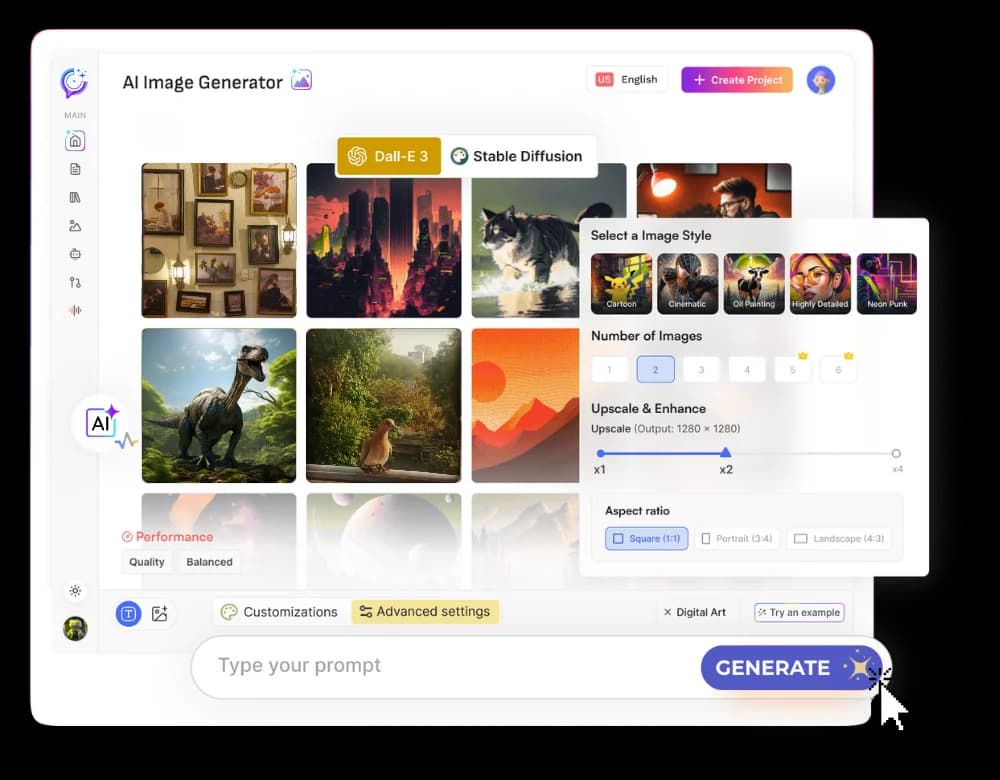
At the heart of Textalky’s visual creation capabilities is its powerful AI Image tool. This feature allows you to translate your ideas into compelling graphics using simple text prompts. Imagine describing the exact scene, characters, or concepts you need for your thumbnail, and having a unique image generated in moments. This integrated approach eliminates the need to jump between multiple applications, saving you time and streamlining your entire creative process.
How to Create Thumbnails with Textalky's AI Image Tool
Using Textalky's AI Image tool to create thumbnails is straightforward, even for beginners. Here’s a step-by-step guide:
- Access the AI Image Tool: Log in to your Textalky account and navigate to the AI Image section.
- Craft Your Prompt: This is where you describe what you want to see. Be descriptive. Instead of "a cat," try "a fluffy ginger cat wearing a tiny crown, sitting on a pile of gold coins, in a vibrant, painterly style." Consider the elements of your content: if it's a cooking tutorial, describe ingredients or finished dishes; for a tech review, think about the device or a futuristic interface.
- Select a Style (Optional but Recommended): Textalky often offers various artistic styles - from photorealistic to cartoon, abstract, or cinematic. Choosing a style helps guide the AI and ensures the generated image aligns with your brand or content's tone.
- Generate Images: Click the generate button. The AI will process your prompt and produce several image variations.
- Refine and Iterate: Review the generated images. If they aren’t quite right, you can adjust your prompt, try a different style, or generate again. Small tweaks to your prompt can lead to significantly different results. Experiment with adding details like "dramatic lighting," "close-up shot," or "wide-angle view."
- Download and Use: Once you have an image you’re happy with, download it. You can then use this AI-generated graphic as your thumbnail.
For those focused on video content, Textalky also offers AI YouTube Tools designed to help optimize your channel strategy, which can complement your thumbnail efforts.
Beyond Images: Enhancing Your Thumbnails with Other AI Tools
The power of Textalky extends beyond just image generation. The true strength of an all-in-one studio lies in how its various AI tools can work together to enhance your entire content creation workflow, including elements that directly impact your thumbnails and their effectiveness.
For example, the AI Writer can help you brainstorm catchy, attention-grabbing text overlays that you might add to your thumbnail. Think of compelling questions or benefit-driven statements that encourage clicks. You can generate multiple options quickly and select the most impactful one to pair with your AI-generated image.
Furthermore, if your content is video-based, you might use Textalky’s AI Voiceover or AI Music tools to create accompanying promotional clips or background tracks. While not directly part of the thumbnail image itself, these related assets contribute to a cohesive content strategy. Even the AI Transcribe feature can help you quickly pull key quotes or phrases from your video content, which could then be used to inspire thumbnail text or title ideas.
The Cost-Effective Advantage of an All-in-One Studio
When you tally up the costs of subscribing to separate tools for AI writing, AI image generation, AI voiceovers, and potentially video editing, the expenses can mount quickly. This is where Textalky shines as an all-in-one AI studio. Instead of paying multiple monthly fees for specialized services, you get access to over 20 AI tools, including advanced image creation and writing assistants, under a single subscription.
This consolidation not only saves money but also significantly reduces complexity. You have one login, one interface, and one billing cycle. This efficiency is invaluable for creators who need to maximize their budget and minimize administrative overhead. You can explore all plans and current pricing to see how Textalky compares to the cost of acquiring similar capabilities piecemeal. The value proposition is clear: one subscription replaces many, offering a more streamlined and economical path to high-quality content creation.
Unlock Your Creative Potential with Textalky
Creating stunning, attention-grabbing thumbnails is no longer an insurmountable challenge requiring specialized design skills or a large budget. With Textalky, you have a powerful, integrated AI creative studio at your fingertips. You can generate unique visuals, craft compelling text, and streamline your entire content workflow, all within a single, cost-effective platform.
For creators looking to maximize their output and minimize their expenses, Textalky offers an unparalleled solution. The AI Lifetime Pro deal provides lifetime access to the full suite of tools for a single, one-time payment. This is the most comprehensive and value-packed option, allowing you to harness the power of AI for all your creative needs without ongoing subscription worries. Explore what Textalky can do for you and start creating more engaging content today.
Frequently asked questions
What makes a good thumbnail for YouTube?
A good YouTube thumbnail is visually striking, clearly communicates the video's topic or benefit, and sparks curiosity. Key elements include high-quality imagery, bold and readable text (if used), strong color contrast, and a consistent style that aligns with your channel's brand. It should accurately represent the video's content while enticing viewers to click.
How can AI help me create better thumbnails?
AI, particularly AI image generation, helps by allowing you to create unique, custom visuals quickly using simple text prompts. This bypasses the need for design skills and expensive software. AI can generate a wide variety of styles and concepts, enabling rapid experimentation to find the most effective thumbnail design for your content, thereby increasing your click-through rates.
Is Textalky's AI image generator easy to use for beginners?
Yes, Textalky's AI image generator is designed to be user-friendly for beginners. The core functionality relies on descriptive text prompts, which is a natural way to communicate your vision. While mastering prompt engineering takes practice, the tool provides a low barrier to entry, allowing anyone to start generating custom images for their thumbnails with relative ease.
Ready to try it yourself?
Create a free Textalky account - no credit card required - and put this into practice.
Start creating for free