Create Engaging YouTube Videos with an AI Voice Generator
Bring your YouTube videos to life with compelling AI-generated voiceovers. Learn how to use Textalky's advanced voice tools to narrate content, add personality, and boost viewer engagement.
9 min read · August 31, 2026
Create Engaging YouTube Videos with an AI Voice Generator
Creators often struggle to produce consistent, high-quality voiceovers for their YouTube videos. The cost of professional voice actors, the time commitment of recording and editing, or the technical hurdles of setting up a home studio can be daunting. Even if you overcome these, older text-to-speech tools often sound robotic, detracting from viewer engagement. This is where an AI voice generator can become an indispensable tool for any YouTube creator, digital marketer, or video producer looking to elevate their content.
Why AI Voiceovers Are Essential for YouTube Creators
The benefits of using AI voiceovers for your YouTube channel are significant. Firstly, they offer a compelling cost-effectiveness. Hiring professional voice talent can quickly become a substantial expense, especially for channels producing frequent content. An AI voice generator provides access to a vast library of high-quality narration at a fraction of the cost.
Speed and consistency are other major advantages. Need to update a script or re-record a segment? With an AI voice, this can often be done in minutes, a pace that is impossible with human recording sessions. This speed allows for rapid iteration and responsiveness to audience feedback or trending topics. Furthermore, AI voices deliver a consistent tone and delivery every time, eliminating variations that can arise from different human narrators or even the same narrator on different days. This uniformity contributes to a polished, professional feel for your channel.
AI voice generation also helps overcome specific limitations of human narration. For content requiring extremely precise pronunciation of technical terms, or for projects needing a specific, almost detached tone, AI excels. It can also be invaluable for creators who are shy or uncomfortable speaking on camera or into a microphone, enabling them to produce engaging narrated content without appearing on screen themselves. The ability to generate an AI voiceover that perfectly matches your content's needs can significantly enhance viewer experience and contribute to channel growth.
Choosing the Right AI Voice Generator for Your Channel
Not all AI voice generators are created equal, and selecting the right one for your YouTube workflow is crucial. Several key features should guide your decision.
Voice quality is paramount. Look for generators that offer natural-sounding voices with a wide range of emotions and intonations. Robotic or monotonous voices will quickly disengage your audience. Textalky, for instance, offers over 50 studio-grade voices, providing a diverse selection to match different content styles and moods.
Language and accent support are also important, especially if you aim for a global audience. A generator with broad language options, like Textalky's 150+ languages and accents, ensures you can cater to different linguistic demographics.
Customization options can make a significant difference in achieving a unique brand voice. Features like adjustable speech rate, pitch, and emphasis allow you to fine-tune the AI's delivery to sound more human and engaging. The ability to clone your own voice or a specific actor's voice, through voice cloning, offers unparalleled branding opportunities and consistency.
Finally, ease of use is a critical factor. A complex interface will slow down your production process. Look for an intuitive platform where you can easily input scripts, select voices, adjust settings, and export audio files without a steep learning curve.
Textalky's AI Voice Tools: Your YouTube Narration Solution
Textalky is designed as an all-in-one AI creative studio, meaning it consolidates many essential creative tools under a single subscription, including powerful AI voice generation capabilities tailored for creators. For YouTube content, Textalky offers a suite of features that directly address the needs of video producers.
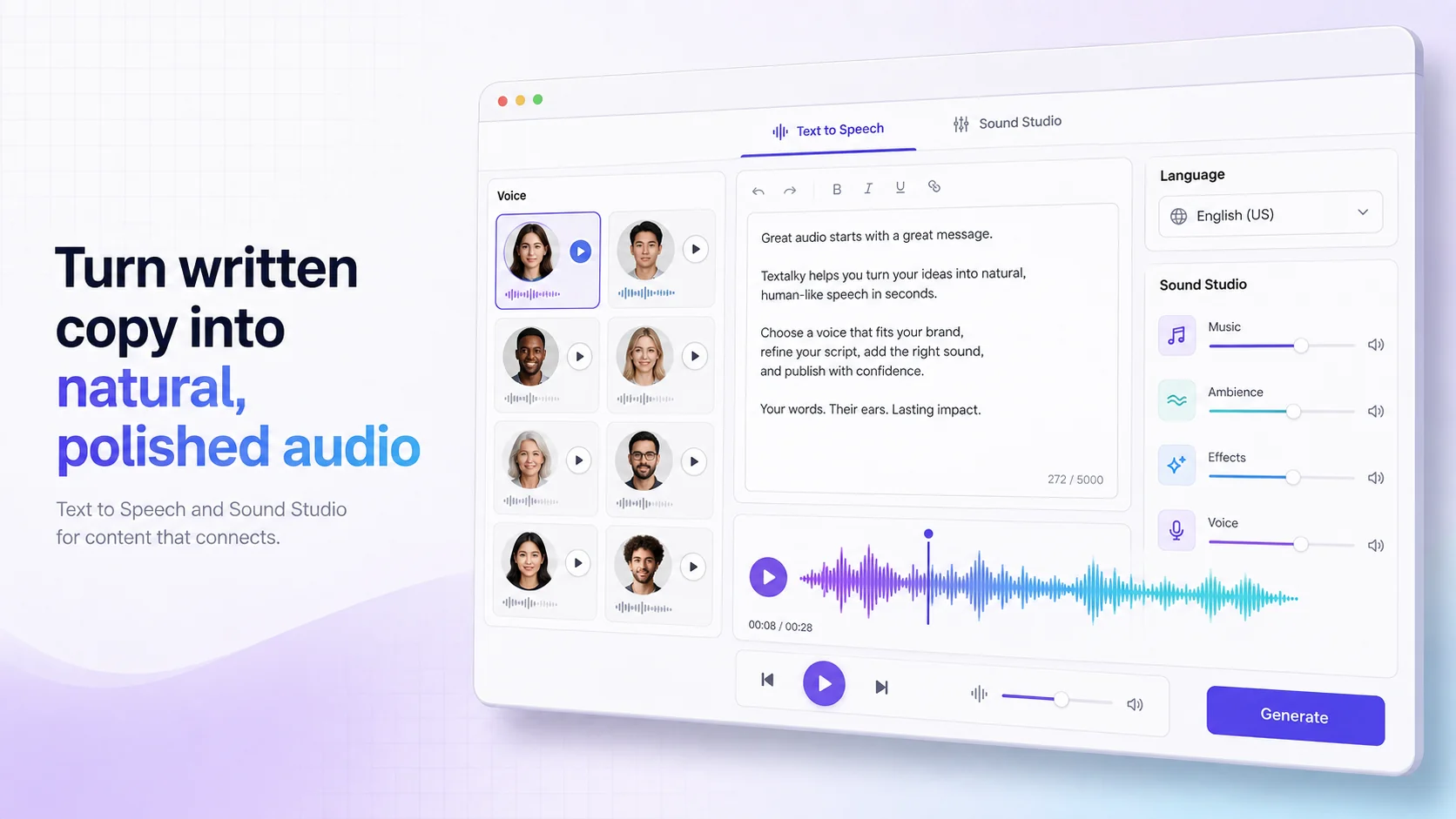
At its core is the AI Voiceover tool, which transforms written scripts into spoken audio. With over 50 studio-grade voices and support for more than 150 languages and accents, you can find the perfect narrator for any video. Beyond simple text-to-speech, Textalky also provides advanced features like AI Voice Cloning, allowing you to create a unique, branded voice for your channel. This is particularly useful for maintaining brand consistency across all your content.
For creators who need to clean up existing audio or isolate dialogue, the AI Voice Isolator removes background noise, ensuring your narration is clear and professional. And for those looking to add background music or sound effects, Textalky's AI Music and Sound Studio capabilities allow for the creation and editing of audio elements directly within the platform. The Sound Studio feature enables you to edit, merge, mix, and master your audio, giving you complete control over your sound design.
These integrated voice and sound tools, combined with the rest of Textalky's creative suite, mean you can manage your entire audio production workflow in one place. You can explore Textalky's plans and pricing to find the option that best suits your channel's needs and budget.
Step-by-Step: Generating Voiceovers for Your YouTube Videos
Using Textalky's AI voice generator to create narration for your YouTube videos is a straightforward process. Here’s a practical walkthrough:
- Write Your Script: Start with a well-written script. For YouTube, this means writing conversationally, keeping viewer attention in mind. Consider pacing and where you might want pauses or emphasis.
- Input Your Script: Log into your Textalky account and navigate to the AI Voiceover tool. Paste your script into the provided text editor.
- Select Your Voice: Browse the extensive library of voices. Listen to samples to find one that best fits your video's tone and style. Consider the accent and gender that will resonate most with your target audience.
- Customize Delivery: Adjust parameters like speech rate, pitch, and volume to achieve a natural flow. For example, a slightly slower pace might be better for educational content, while a faster pace could suit a quick news update. You can also use SSML (Speech Synthesis Markup Language) tags for more granular control over pronunciation, pauses, and emphasis, helping to make the delivery sound more human.
- Preview and Refine: Listen to the generated audio. Does it sound right? Are there any awkward phrases or unnatural inflections? Make any necessary edits to the script or voice settings and re-generate. This iterative process is key to achieving a polished final product.
- Export Your Audio: Once you are satisfied with the voiceover, export the audio file. Textalky typically offers common audio formats like MP3 or WAV, which are compatible with most video editing software.
- Integrate into Video Editor: Import the exported audio file into your video editing software (e.g., Adobe Premiere Pro, Final Cut Pro, DaVinci Resolve, or even simpler tools). Sync the narration with your visuals, ensuring the voiceover complements the on-screen action and pacing.
Tips for Natural Delivery and Pacing:
- Read Aloud First: Before pasting into the AI, read your script aloud yourself. This helps identify awkward phrasing and natural places for pauses.
- Use Punctuation Intelligently: Commas, periods, and even ellipses can signal pauses to the AI. Experiment with adding extra punctuation where you want a slight break.
- Emphasize Key Words: If your AI tool supports SSML, use tags to emphasize specific words or phrases that are crucial for conveying meaning.
- Vary Sentence Structure: Just like human speech, a mix of short and long sentences keeps the narration engaging.
- Consider Tone: If your AI tool allows for emotion selection, choose one that matches the context of your video.
Beyond Narration: Enhancing YouTube Videos with AI
The power of Textalky extends far beyond just voiceovers, offering a comprehensive toolkit to enhance your entire YouTube content creation process.
For scripting, the AI writing tools can be invaluable. Whether you're brainstorming video ideas, drafting detailed scripts, or refining existing text, the AI Writer and Article Wizard can help you produce compelling content more efficiently. This ensures your scripts are engaging and well-structured before you even get to the voiceover stage.
Visuals are paramount on YouTube, and Textalky's AI Visual Creation suite can assist here too. The AI Image generator can create custom graphics, thumbnails, or background elements for your videos. For more dynamic content, AI Video tools can help generate short clips or animations. Furthermore, AI Avatars can be used to create virtual presenters, offering an alternative to on-screen appearances or complementing human hosts.
Textalky also offers specific AI YouTube tools designed to optimize your channel. These can assist with generating catchy video titles, compelling descriptions, and effective tags, all of which are critical for discoverability and audience engagement. The platform's AI Chat and File Chat features can also be used to analyze audience comments or research topics, providing insights to inform your content strategy.
By integrating these various AI capabilities, you can streamline your production pipeline, from initial concept and scriptwriting through to narration, visuals, and optimization, all within a single creative studio.
Integrating AI Voice into Your YouTube Workflow
Incorporating AI voice generation into your existing video production workflow doesn't have to be complicated. The key is to view it as another tool in your arsenal, much like your video editor or graphic design software.
Start by identifying where AI voiceovers can provide the most benefit. This might be for explainer videos, educational content, product reviews, or even as background narration for montages. If you're new to AI voices, begin with a simple script and a standard voice to get comfortable with the process.
When editing, pay close attention to syncing the audio with your visuals. Ensure that the pacing of the voiceover matches the on-screen action or the flow of your presentation. You can use your video editor to add subtle background music or sound effects that complement the AI narration without overpowering it.
For channels that use multiple voiceovers or require consistent branding, consider creating a "voice profile" within Textalky using AI Voice Cloning. This ensures a consistent vocal identity across all your videos.
Publishing strategies can also be informed by AI. Use the AI YouTube tools to craft titles and descriptions that accurately reflect the content and entice viewers. Analyze the performance of your videos and use AI writing tools to adapt your content strategy based on what resonates with your audience.
Frequently asked questions
#### Can I use AI voice generators for commercial YouTube videos?
Yes, you generally can use AI voice generators for commercial YouTube videos. Most reputable AI voice providers, including Textalky, grant commercial rights to the audio generated, provided you adhere to their terms of service. This means you can monetize your videos and use the AI-generated voiceovers in any professional capacity. It's always a good practice to review the specific licensing terms of the AI tool you choose to ensure full compliance.
#### How do I make AI voices sound more natural for YouTube?
Making AI voices sound more natural involves several techniques. First, choose high-quality, natural-sounding voices from your generator. Textalky offers over 50 studio-grade voices. Second, carefully craft your script, reading it aloud to identify awkward phrasing and natural pauses. Use punctuation deliberately to guide the AI's pacing. Adjust speech rate and pitch in the generator's settings. For more advanced control, utilize SSML tags to dictate emphasis and pauses. Finally, integrate the AI voiceover thoughtfully into your video editing, ensuring it complements the visuals and other audio elements.
#### What is the best AI voice generator for YouTube content creators?
The "best" AI voice generator depends on your specific needs, but a strong contender for YouTube creators is Textalky. It offers a wide array of over 50 high-quality, studio-grade voices in 150+ languages and accents, along with powerful features like AI voice cloning and a comprehensive Sound Studio for audio editing. Crucially, it integrates these voice capabilities with other essential tools for creators, such as AI writing, visual creation, and specific YouTube optimization tools, all within a single, unified platform. This all-in-one approach can streamline your workflow significantly.
Textalky provides a robust solution for creators looking to produce professional, engaging YouTube content. By combining advanced AI voice generation with a suite of complementary creative tools, it empowers you to overcome the common hurdles of audio production and enhance your videos from script to final upload.
If you're ready to elevate your YouTube channel with high-quality AI narration and a streamlined creative process, consider exploring Textalky. You can sign up and start creating today at lab.textalky.app/register.
Ready to try it yourself?
Create a free Textalky account - no credit card required - and put this into practice.
Start creating for free