AI Voiceover for Explainer Videos: Your Guide to Professional Narration
Elevate your explainer videos with high-quality AI voiceovers. Discover how to select, customize, and integrate AI narration for maximum impact.
12 min read · September 4, 2026
Producing explainer videos that clearly communicate your message and engage your audience often hinges on the quality of the narration. However, hiring professional voice actors can be a significant expense and a time-consuming process, especially for content creators, marketers, educators, and small business owners operating on tighter budgets or with limited technical expertise. The challenge extends beyond cost; finding a voice that truly resonates with your brand's tone and the video's core message can be difficult, and traditional recording setups present a barrier for many.
Fortunately, AI voiceover technology offers a powerful and accessible solution. This guide explores how to leverage AI to create professional, compelling narration for your explainer videos, providing a practical, step-by-step approach that prioritizes quality, customization, and cost-effectiveness.
Why AI Voiceover is Perfect for Explainer Videos
The traditional route to explainer video narration involves finding, auditioning, hiring, and directing a voice actor, followed by studio time and post-production. While this can yield excellent results, it comes with inherent limitations that AI voiceover bypasses.
- Cost Savings: Professional voice actors and studio time can quickly add up. Hiring even a moderately experienced voice actor can cost hundreds or thousands of dollars for a single project. AI voiceover, on the other hand, offers a significantly more affordable alternative. With a single subscription or a one-time purchase, you gain access to a vast library of voices without recurring per-project fees. This makes professional-sounding narration accessible even on a shoestring budget.
- Speed and Efficiency: Need a narration today? AI voiceover tools can generate high-quality audio within minutes, not days or weeks. This rapid turnaround is invaluable for projects with tight deadlines or for creating multiple variations of explainer content. You can iterate on scripts and generate new audio versions instantly, dramatically accelerating your production pipeline.
- Consistency and Control: Ensuring a consistent tone and delivery across multiple explainer videos, or even within a single long video, can be a challenge with human voice actors. AI voices offer perfect consistency. Once you select a voice and a tone, it will deliver the exact same performance every time. This level of control is crucial for maintaining brand identity and ensuring clarity.
- Vast Selection of Voices and Languages: The range of AI voices available today is astonishing. You can choose from diverse accents, ages, genders, and speaking styles. Furthermore, AI voiceover technology supports over 150 languages and accents, opening up global reach for your explainer videos without needing to find multilingual voice actors. This makes localization and international marketing far more manageable.
- Accessibility for All Skill Levels: You don't need to be an audio engineer or a seasoned director to produce great voiceovers with AI. The process is typically straightforward, involving pasting your script into a text field and selecting your desired voice. This democratizes professional audio production, putting it within reach of anyone with a story to tell.
Compared to the limitations of traditional methods, AI Voiceover presents a compelling case for explainer video creators. For a deeper dive into the technology, explore our guide on AI Text to Speech: The Complete Guide for Creators.
Choosing the Right AI Voice: Beyond Just Text-to-Speech
Not all AI voices are created equal, and selecting the right one is critical for your explainer video's success. It’s about more than just converting text to speech; it’s about finding a voice that becomes an extension of your brand and message.
When selecting an AI voice, consider these factors:
- Brand Alignment: Does the voice's tone and style match your brand's personality? Is your brand serious and authoritative, or friendly and approachable? A voice that conflicts with your brand can create dissonance for your audience. Textalky offers 50+ studio-grade voices, providing a wide palette to choose from.
- Target Audience: Who are you trying to reach? A voice that appeals to teenagers might not be suitable for a professional audience, and vice versa. Consider the age, demographics, and expectations of your viewers.
- Video Content and Tone: The voice should complement the subject matter of your explainer video. A technical tutorial might benefit from a clear, precise voice, while a video explaining a new consumer product might call for a more enthusiastic and engaging tone.
- Emotion and Nuance: While AI voices have advanced significantly, some are better at conveying subtle emotions than others. Look for voices that offer a range of emotional inflections, from neutral to excited, concerned, or reassuring. This helps make the narration more dynamic and relatable.
- Clarity and Pronunciation: For explainer videos, clarity is paramount. The AI voice must pronounce words clearly and accurately, especially technical terms or brand-specific jargon. High-quality AI models, like those powering Textalky, are trained on vast datasets to ensure excellent pronunciation across many languages.
- Accent and Dialect: Choose an accent that your target audience will understand and trust. While standard accents are often safe, a specific regional accent might be beneficial if your audience is concentrated in that area.
- Studio-Grade Quality: Opt for AI voice solutions that emphasize studio-grade quality. This means minimal robotic artifacts, natural-sounding intonation, and a polished final output that doesn't distract from your message.
By carefully considering these elements, you can move beyond basic text-to-speech and select an AI voice that enhances, rather than detracts from, your explainer video's effectiveness.
Crafting Your Explainer Video Script for AI Narration
Writing a script for an AI voiceover requires a slightly different approach than writing for a human actor. While AI has become incredibly sophisticated, optimizing your script can ensure the most natural and effective narration.
Here are tips for writing scripts tailored for AI voice narration:
- Clarity and Conciseness: AI performs best with clear, straightforward language. Avoid overly complex sentence structures, jargon that isn't explained, or ambiguous phrasing. Get straight to the point.
- Pacing and Pauses: Think about where natural pauses should occur. You can often indicate pauses within the text by using punctuation like commas and periods, or by explicitly adding pause markers if your AI tool supports them. This helps the AI deliver the script at a natural rhythm.
- Pronunciation of Proper Nouns and Acronyms: If your script includes unusual names, brand terms, or acronyms, consider how the AI might pronounce them. Some AI tools allow for phonetic spelling or pronunciation guides to ensure accuracy. For instance, if you have a unique product name, you might need to guide the AI on how to say it.
- Read Aloud as You Write: The best way to catch awkward phrasing or sentences that are difficult to read is to read your script aloud as you write it. This helps you identify areas where an AI might stumble or sound unnatural.
- Keep Sentences Manageable: Long, rambling sentences can be challenging for any narrator, AI or human. Break down complex ideas into shorter, digestible sentences.
- Use the AI Writing Editor: Tools like Textalky's AI Writing Editor can be invaluable for script development. You can use it to brainstorm ideas, refine your message, and even check for clarity and conciseness before you generate the voiceover. The AI can help you structure your script, ensuring a logical flow of information.
By paying attention to these scriptwriting nuances, you can ensure your AI-generated narration sounds as natural and engaging as possible, making your explainer videos more effective.
Integrating AI Voiceover into Your Explainer Video Workflow
Once you have your script and have chosen your AI voice, the next step is to generate the audio and integrate it into your video project. An all-in-one creative studio simplifies this process immensely.
Here's a practical workflow:
- Generate the AI Voiceover:
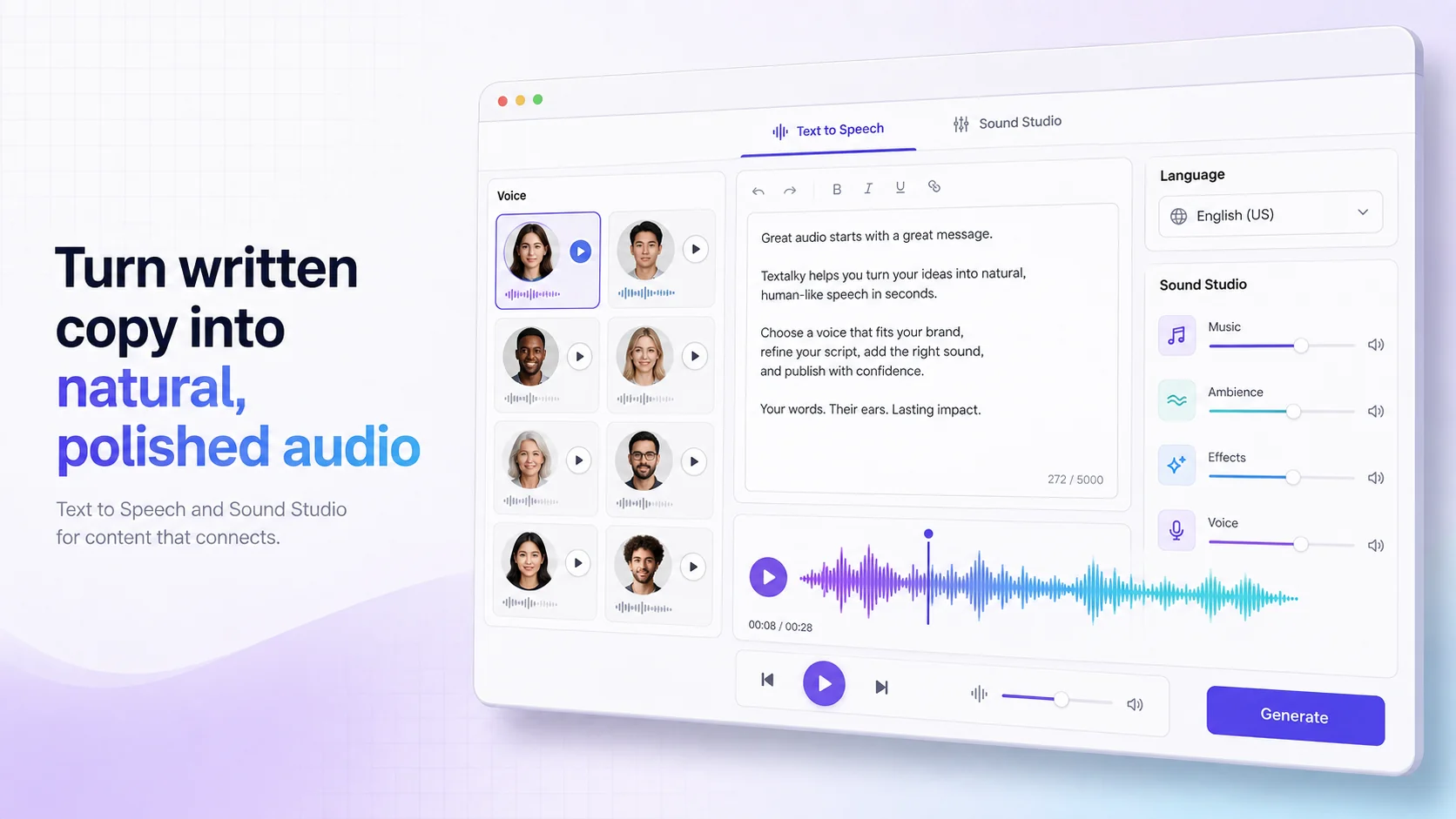
- Open your AI voice tool (like Textalky's AI Voiceover feature).
- Paste your optimized script into the text input area.
- Select your chosen voice, language, and any desired emotional tone or speaking style.
- Preview the audio. Most tools offer a preview so you can hear how it sounds before committing to generation.
- Generate the final audio file. This is typically available as an MP3 or WAV download.
- Edit and Refine Your Audio:
- Even with high-quality AI voices, minor edits can enhance the final product. You might want to adjust pacing, remove unintended sounds, or ensure smooth transitions between sentences.
- This is where a tool like Textalky's Sound Studio becomes essential. It allows you to edit, merge, and master your audio clips. You can adjust volume levels, add background music, and ensure the overall sound quality is polished and professional.
- Import into Your Video Editor:
- Once your AI voiceover audio is ready and perfected, import the audio file into your preferred video editing software.
- Synchronize the audio with your video footage, animations, or graphics. Ensure the narration aligns perfectly with the on-screen action or visuals.
- Add Music and Sound Effects:
- To further enhance engagement, consider adding background music or sound effects. Many AI studios offer integrated music generation tools.
- Ensure the background music doesn't overpower the voiceover. Adjust volume levels accordingly.
By following these steps, you can smoothly integrate your AI-generated narration into your explainer video, creating a cohesive and professional final product.
Enhancing Your Explainer Videos with Other AI Tools
The true power of an integrated creative studio lies in its ability to streamline your entire production process. Beyond just voiceover, Textalky offers a suite of AI tools that can elevate your explainer videos from good to exceptional, all within a single interface.
- AI Video Generation: Need visuals to accompany your narration? Textalky's AI Video tools can help you create dynamic video content. Whether you're generating short clips from text prompts or transforming existing videos, these tools can provide the visual backbone for your explainer.
- AI Avatars: For a more personal touch, consider using AI Avatars. These animated characters can deliver your narration, making your explainer videos feel more like a presentation or a one-on-one conversation. This can be particularly effective for corporate training or product demonstrations. Textalky offers AI Avatars as part of its creative suite.
- AI Music: A well-chosen background score can significantly impact the mood and engagement of your explainer video. Instead of searching for stock music, you can use AI music generators to create unique soundtracks tailored to your video's theme and pacing.
- AI Writing Assistance: As mentioned earlier, the AI Writing Editor isn't just for scripts. It can help you brainstorm video concepts, write compelling descriptions, or even generate marketing copy to promote your explainer videos.
- The Advantage of an All-in-One Studio: The biggest benefit of using an all-in-one AI studio like Textalky is the seamless integration. You avoid the hassle of managing multiple subscriptions, learning different interfaces, and transferring files between various platforms. Everything you need - from scriptwriting and voiceover to video creation and audio mastering - is accessible in one place. This dramatically reduces friction in your creative workflow, saving you time and reducing the potential for errors.
By combining AI voiceover with other AI-powered creative tools, you can produce sophisticated explainer videos that were once only possible with large production teams and budgets.
Maximizing Your Explainer Video ROI with Textalky
The ultimate goal of producing explainer videos is to achieve a strong return on investment (ROI). This means effectively communicating your message, engaging your audience, and driving desired actions, all while managing your resources efficiently. Using an integrated AI creative studio like Textalky directly impacts your ROI in several key ways.
- Reduced Production Costs: As detailed throughout this guide, the cost savings associated with AI voiceover and other AI production tools are substantial. By eliminating the need for expensive voice actors, studio rentals, and potentially even freelance video editors, you drastically cut down your production expenses. This allows you to allocate more budget to other aspects of your marketing or content strategy, or simply increase your profit margins.
- Increased Content Output: The speed and efficiency of AI tools mean you can produce more explainer videos in less time. Whether you need to quickly create a series of product demos, update training materials, or respond to market trends, AI empowers you to scale your content production. More content, produced efficiently, can lead to greater audience reach and engagement over time.
- Faster Time-to-Market: In today's competitive digital landscape, speed matters. Being able to launch your explainer videos quickly allows you to capitalize on opportunities, stay ahead of competitors, and deliver timely information to your audience. AI accelerates every stage of production, from scriptwriting to final rendering.
- Consistent Brand Messaging: A unified brand voice and visual style across all your explainer content reinforces brand identity and builds trust. The control offered by AI tools ensures this consistency, which is vital for long-term brand building.
For those looking to make a significant, one-time investment in a comprehensive AI creative suite, Textalky offers an exceptional value. The AI Lifetime Pro deal provides lifetime access to all the tools within the studio for a single payment of $79. This includes features like AI Voiceover, AI Writing Editor, AI Video, and many more, with monthly quotas that reset each month. It's a powerful way to equip yourself with a complete AI creative studio without ongoing subscription fees. Explore the details of this offer at the AI Lifetime Pro deal page.
By embracing AI-powered tools, you're not just adopting new technology; you're adopting a more efficient, cost-effective, and scalable approach to content creation that can significantly boost your ROI.
Frequently asked questions
Can AI voiceovers sound natural for explainer videos?
Yes, AI voiceovers have advanced to the point where they can sound remarkably natural, especially for explainer videos. Modern AI models, like those powering Textalky, offer a wide range of studio-grade voices with nuanced intonation, appropriate pacing, and clear pronunciation. While subtle human emotion can still be a differentiator, for clear and informative narration in explainer content, AI voices are often indistinguishable from human recordings and can even outperform them in consistency and clarity.
What is the cost of using AI voiceover for explainer videos?
The cost of AI voiceover varies depending on the provider and the plan. Textalky offers a range of options, starting with a free plan that includes limited word and character counts. Paid plans offer significantly more capacity. For example, the AI Basic plan costs $6 per month, and the AI Explorer plan is $12 per month. For unlimited potential and access to all tools, the AI Lifetime Pro deal is available for a one-time payment of $79, offering substantial long-term savings. Compared to hiring professional voice actors, which can cost hundreds or thousands per project, AI voiceover represents a significant cost reduction.
How do I add an AI voiceover to my explainer video?
Adding an AI voiceover to your explainer video typically involves a few straightforward steps:
- Write your script: Craft your narration clearly and concisely.
- Generate the voiceover: Use an AI voice tool, such as Textalky's AI Voiceover feature, to paste your script and select your desired voice, language, and tone. Download the generated audio file.
- Edit the audio (optional but recommended): Use an audio editing tool, like Textalky's Sound Studio, to refine pacing, remove any unwanted sounds, or add background music.
- Import into your video editor: Load the final audio file into your video editing software.
- Synchronize: Align the AI voiceover with your video footage and visuals.
This process allows you to quickly create professional-sounding narration for your explainer videos without needing specialized audio equipment or expertise.
Ready to transform your explainer video production? Textalky provides an integrated suite of AI tools designed to streamline your creative workflow, from script to final render. Explore all the features and discover how an all-in-one studio can simplify your process.
For a powerful and cost-effective solution, consider our featured AI Lifetime Pro deal. Get lifetime access to our complete AI creative studio for a single, one-time payment of $79. This is the perfect opportunity to equip yourself with professional AI tools without ongoing subscription costs. Visit the AI Lifetime Pro deal page to learn more and secure this offer while it lasts.
Ready to try it yourself?
Create a free Textalky account - no credit card required - and put this into practice.
Start creating for free