The Best Free Voice Cloning Apps: What You Need to Know
Looking for a free voice cloning app? Discover the best options available, understand their features, and learn how to create your own AI voice.
9 min read · September 4, 2026
The allure of creating your own unique AI voice is powerful. For content creators, podcasters, and even those just curious about AI technology, the idea of a personalized digital voice can open up a world of creative possibilities. However, the cost of professional voice cloning software can be a significant barrier. This leads many to search for "free voice cloning app" solutions, hoping to experiment and produce content without a substantial financial outlay.
The challenge, as many discover, is that truly free, high-quality voice cloning is a rare commodity. While some options exist, they often come with limitations that can hinder your creative flow or the quality of your output. Understanding these limitations is the first step to finding a solution that genuinely meets your needs.
Understanding 'Free' in Voice Cloning Apps
When you search for a "free voice cloning app," what you often find are services offering limited access. This "free" tier is typically a gateway to a paid subscription, designed to let you sample the technology. Common restrictions include:
- Limited Credits or Usage: You might get a small number of characters or minutes to clone and generate audio each month. Once these run out, you need to upgrade.
- Restricted Features: The most advanced cloning capabilities, higher quality outputs, or a wider selection of voices might be locked behind a paywall.
- Quality Restrictions: Free versions may produce lower fidelity audio, more robotic-sounding voices, or have less natural intonation.
- Commercial Use Limitations: Some free tools prohibit using the cloned voices for commercial projects, requiring a paid license.
- Watermarks or Attribution: You may need to attribute the service or have watermarks on your generated audio.
These limitations mean that while you can experiment, producing professional-grade content consistently often requires moving beyond the free offerings. The ability to perform AI Voice Cloning without these constraints is what truly empowers creators.
Top Free Voice Cloning App Options (and Their Caveats)
While a perfect, unlimited free voice cloning app is elusive, several platforms offer free tiers or trials that allow for some exploration. Here are a few common types of tools and what to expect:
- Freemium AI Voice Generators: Many AI voice platforms offer a free plan with a limited number of characters or audio minutes per month. These can be great for testing short phrases or simple voiceovers. However, for longer projects like podcast episodes or audiobooks, you'll quickly exceed these limits.
- Trial Versions: Some professional voice cloning software provides a free trial period. This allows you to experience the full capabilities for a limited time, giving you a taste of what premium tools offer. The challenge here is the temporary nature of access.
- Open-Source Projects: For the technically inclined, there are open-source voice cloning models available. While these can offer more flexibility, they often require significant technical expertise to set up, train, and run, and may not come with user-friendly interfaces.
- Limited Feature Tools: Some specific apps might offer basic voice cloning for free but lack advanced controls for emotion, tone, or fine-tuning. The resulting audio might sound generic or lack the natural cadence needed for engaging content.
The core issue with most "free" options is scalability and quality. As your projects grow in scope and your demand for high-fidelity audio increases, these limitations become frustrating. This is where a more comprehensive and accessible solution becomes invaluable.
Introducing Textalky: Powerful AI Voice Cloning Without the Premium Price Tag
For creators who need more than a taste of voice cloning but are wary of exorbitant costs, Textalky offers a compelling alternative. Textalky is an all-in-one AI creative studio, meaning it consolidates a wide range of AI tools, including professional-grade AI Voice Cloning, into a single, easy-to-use interface. You don't need separate subscriptions for different AI functions.
Textalky's AI Voice Cloning feature is designed for both ease of use and impressive results. For creators who need more than a taste of voice cloning, you can capture the essence of a voice and generate realistic, natural-sounding audio. The platform focuses on delivering high-quality output that can elevate your content, from explainer videos and marketing materials to personalized audio experiences.
The beauty of Textalky lies in its integration. Instead of juggling multiple tools and their associated costs, you get a comprehensive suite of creative AI capabilities under one roof. This approach not only simplifies your workflow but also makes advanced technologies like voice cloning far more accessible.
How Textalky's Voice Cloning Works
Getting started with Textalky's AI Voice Cloning is a straightforward process, designed to be intuitive even for those without a technical background. The platform guides you through each step, ensuring you can achieve professional results with minimal effort.
- Record or Upload Audio: You'll need a clear audio sample of the voice you wish to clone. This can be a recording you make directly within Textalky or an audio file you upload. High-quality, clean audio with minimal background noise is crucial for the best results.
- AI Training: Once you provide the audio, Textalky's AI processes the sample. The system analyzes the unique characteristics of the voice, including pitch, tone, accent, and cadence.
- Generate Voice: After the AI has processed the sample, you can start generating new audio using your cloned voice. You simply input the text you want the AI to speak, select your cloned voice, and the system generates the audio output.
- Refine and Edit: Textalky often provides tools to refine the generated audio, allowing for adjustments to speed, pitch, or emotional tone to better match your needs.
This streamlined workflow makes it possible to create custom AI voices quickly and efficiently. For a more detailed walkthrough, you can explore Textalky's resources, including a step-by-step guide to voice cloning. The focus is on empowering users to create unique vocal assets without needing to be AI experts.
Beyond Cloning: The Full AI Voice Suite at Your Fingertips
Textalky isn't just about voice cloning. As a complete AI creative studio, it offers a comprehensive suite of tools designed to meet all your audio and content creation needs. This integration is what sets Textalky apart from single-purpose apps.
Within the AI Voice and Sound section, you'll find:
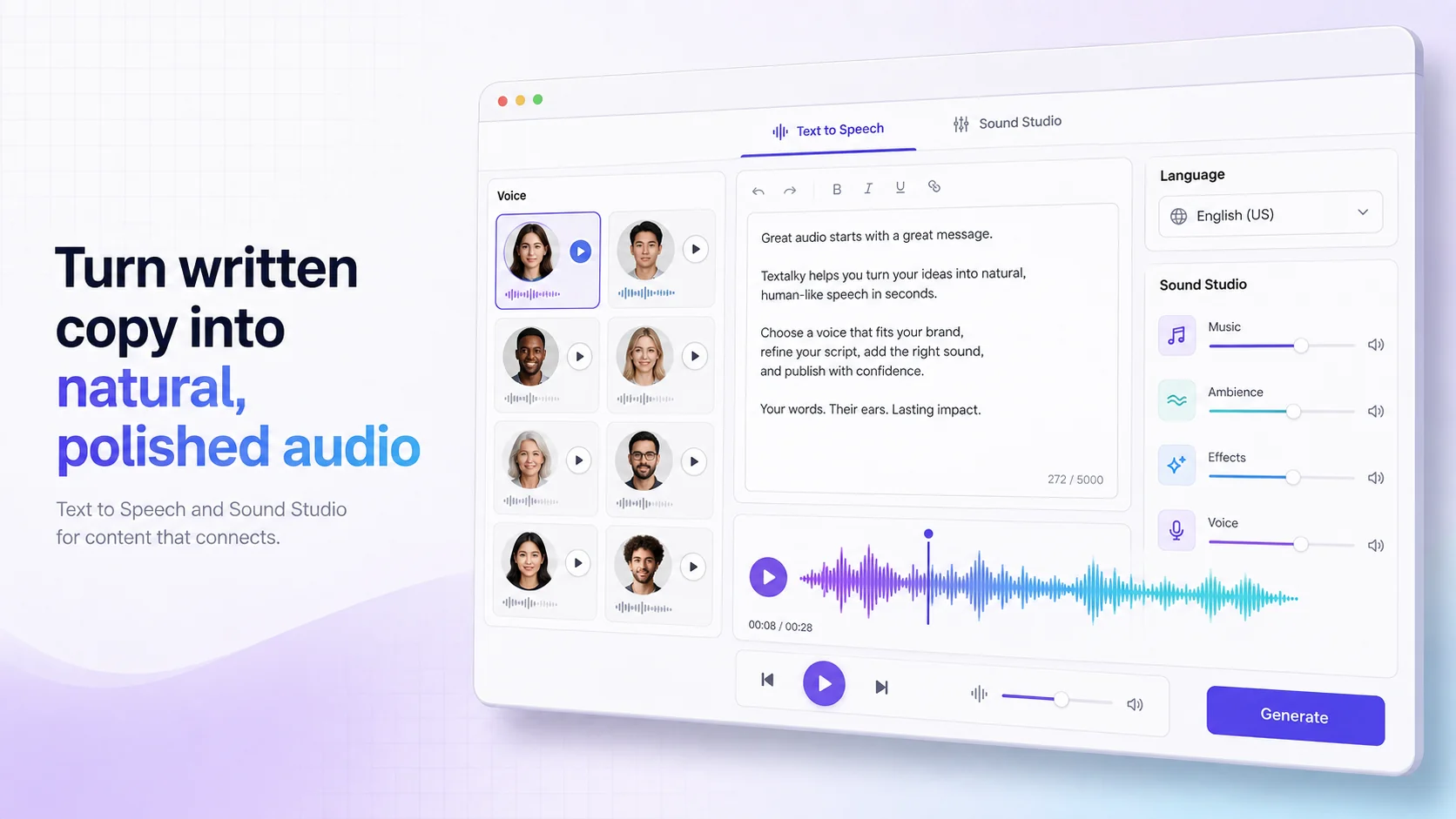
- AI Voiceover (Text to Speech): Beyond cloning, Textalky offers a vast library of high-quality, studio-grade AI voices in over 150 languages and accents. This allows you to generate professional voiceovers from text for videos, presentations, and more.
- AI Transcribe (Speech to Text): Need to convert audio or video files into text? Textalky's transcription tool can accurately transcribe spoken content, saving you hours of manual work.
- AI Voice Isolator: This powerful tool can remove background noise from audio recordings, cleaning up your audio and making it sound more professional.
- AI Music: Generate custom music tracks for your projects, perfect for background scores or intros.
- Sound Studio: Edit, merge, mix, and master your audio projects with built-in tools, giving you granular control over your sound.
By having these features integrated with AI Voice Cloning, Textalky provides a holistic environment for audio production. Whether you're creating podcast episodes, audiobook narration, or voiceovers for video marketing, all the necessary tools are accessible from one platform. This synergy between features dramatically enhances your creative workflow and the potential quality of your output.
Making the Smart Choice: Textalky's Lifetime Deal
When evaluating the cost of AI tools, it's important to consider long-term value. While many platforms offer monthly or annual subscriptions, Textalky presents an exceptional opportunity with its AI Lifetime Pro offer.
This featured, site-wide promotion provides lifetime access to a powerful set of AI tools, including the full voice cloning capabilities, for a single, one-time payment of $79. This is not a subscription that renews annually; it's a one-time purchase for ongoing access. This offer includes monthly quotas for words, characters, media credits, and transcription minutes that reset each month, ensuring you have consistent resources for your creative work as long as Textalky operates the plan.
The AI Lifetime Pro deal grants access to every tool in the studio, from AI writing and image generation to video creation and chatbots. This comprehensive package means you can handle virtually all your AI creative needs without ever needing another subscription. It's designed to be the most cost-effective and complete solution for individuals and small teams looking for sustained access to advanced AI technology.
For those who prefer or require a traditional subscription model, Textalky also offers various plans, such as AI Basic at $6 per month ($59 for the year), AI Explorer at $12 per month ($129 for the year), AI Plus at $29 per month ($229 for the year), and AI Pro at $79 per month ($649 for the year). You can compare all plans and current pricing to find the best fit for your immediate needs. However, the lifetime deal stands out as a remarkable value for ongoing, extensive use.
It's important to note that this lifetime offer is a final-sale promotional item and is non-refundable once the account has been used. Always refer to the specific terms on the AI Lifetime Pro offer page for the most current details.
Conclusion: Elevate Your Content with Advanced AI Voice
The search for "free voice cloning app" solutions often leads to compromises in quality, features, or usability. While free tiers can be useful for initial experimentation, serious content creators, podcasters, and voice actors will find that investing in a comprehensive, yet affordable, solution pays dividends.
Textalky's AI Voice Cloning offers a powerful and accessible way to generate custom AI voices without the steep price tag of many specialized tools. Combined with its extensive suite of AI features, including AI Voiceover, AI Transcribe, and AI Voice Isolator, Textalky provides a complete audio production environment. Whether you're looking to create compelling podcast narration, generate engaging AI voiceover for marketing, or simply explore the possibilities of AI voice, Textalky empowers you to do so efficiently and effectively.
By consolidating all your AI creative needs into one platform, Textalky offers a superior alternative to stacking multiple expensive subscriptions. Consider exploring Textalky as your go-to all-in-one AI studio. For the best long-term value, the AI Lifetime Pro deal is an exceptional opportunity to gain unlimited creative potential for a single, one-time investment.
Frequently asked questions
What is voice cloning?
Voice cloning is a technology that uses artificial intelligence to create a synthetic voice that sounds remarkably similar to a specific human voice. By analyzing a sample of someone's speech, AI algorithms can learn the unique characteristics of that voice - such as pitch, tone, accent, and speaking style - and then generate new audio content that mimics it. This allows for the creation of custom AI voices for various applications, from personalized content to virtual assistants.
Are there truly free voice cloning apps available?
While many apps offer free trials or limited free tiers, truly free voice cloning apps that provide unlimited, high-quality cloning without restrictions are rare. Most "free" options come with limitations on usage, features, or audio quality. These are often designed to give users a taste of the technology before encouraging an upgrade to a paid plan.
What are the limitations of free voice cloning tools?
The limitations of free voice cloning tools typically include:
- Usage Caps: A set number of characters, minutes, or audio generations per month.
- Feature Restrictions: Access to advanced controls, higher fidelity outputs, or a wider range of voice options might be locked.
- Quality Issues: Free versions may produce less natural-sounding voices, have more robotic artifacts, or lower audio resolution.
- Commercial Use Restrictions: Many free tools prohibit using cloned voices for commercial projects without a paid license.
- Watermarks or Attribution: You might be required to credit the service or have watermarks on your generated audio.
How can I use Textalky's voice cloning feature?
Using Textalky's voice cloning feature is a simple, step-by-step process. You'll typically upload or record a clear audio sample of the voice you wish to clone. Textalky's AI then analyzes this sample to capture its unique characteristics. Once processed, you can input any text, select your cloned voice, and generate new audio. This allows for the creation of custom voices for a wide range of content needs.
Ready to try it yourself?
Create a free Textalky account - no credit card required - and put this into practice.
Start creating for free