Generate High-Quality Text to Speech MP3 Files with AI
Transform your text into natural-sounding speech with AI. This guide shows you how to generate high-quality text to speech MP3 files for any project.
7 min read · September 4, 2026
Generate High-Quality Text to Speech MP3 Files with AI
The struggle to create professional-sounding voiceovers is a common hurdle for content creators, educators, marketers, and audiobook producers. Traditional methods can be costly and time-consuming, while many readily available text-to-speech tools produce robotic and unengaging audio. This leaves audiences disengaged and valuable content feeling amateurish. Fortunately, advancements in artificial intelligence offer a powerful solution, enabling you to generate high-quality text to speech MP3 files with ease and efficiency.
Understanding Text to Speech MP3 Generation
Text to speech (TTS) technology converts written text into spoken audio. Think of it as having a digital narrator ready to read any text you provide. The MP3 format is a widely compatible and efficient audio file type, making it ideal for a vast range of applications, from embedding on websites to distributing as audio files.
Historically, TTS technology was characterized by monotonous, robotic voices that were difficult to listen to for extended periods. However, AI has dramatically transformed this landscape. Modern AI-powered AI Voiceover tools, like those found in Textalky, leverage sophisticated algorithms and vast datasets of human speech to create remarkably natural-sounding voices. These AI voices can convey emotion, vary their tone, and adhere to natural speech patterns, making them far more engaging than their predecessors.
Why Choose AI for Text to Speech MP3s?
The shift towards AI for text to speech MP3 generation is driven by several compelling advantages over traditional voice acting or basic TTS software.
- Cost-Effectiveness: Hiring professional voice actors or even renting studio time can incur significant expenses. AI TTS offers a fraction of the cost, providing professional-quality narration without breaking the bank. This is particularly beneficial for creators on a budget or those requiring frequent audio content.
- Speed and Efficiency: Generating audio with AI is incredibly fast. You can convert lengthy documents into spoken word files in minutes, a process that would take hours or days with manual recording. This speed is invaluable for meeting tight deadlines.
- Consistency: AI voices deliver a consistent performance every time. Unlike human narrators who might have off days or slight variations, an AI voice will read your text with the same cadence, tone, and pronunciation each time, ensuring brand consistency across all your audio content.
- Accessibility: AI TTS makes content more accessible to a wider audience. It can be used to create audio versions of written materials for individuals with visual impairments, learning disabilities, or those who simply prefer to consume content audibly.
- Diverse Voices and Languages: Modern AI platforms offer an extensive library of voices in numerous languages and accents. Whether you need a formal British accent for an audiobook, a friendly American voice for a marketing video, or a specific regional dialect, AI can provide it. Textalky, for instance, supports over 150 languages and accents.
Compared to basic TTS, which often sounds unnatural, AI-driven TTS offers a level of realism that can rival human narration. This distinction is crucial for any application where audience engagement and a professional impression are important.
How to Generate Text to Speech MP3s with Textalky
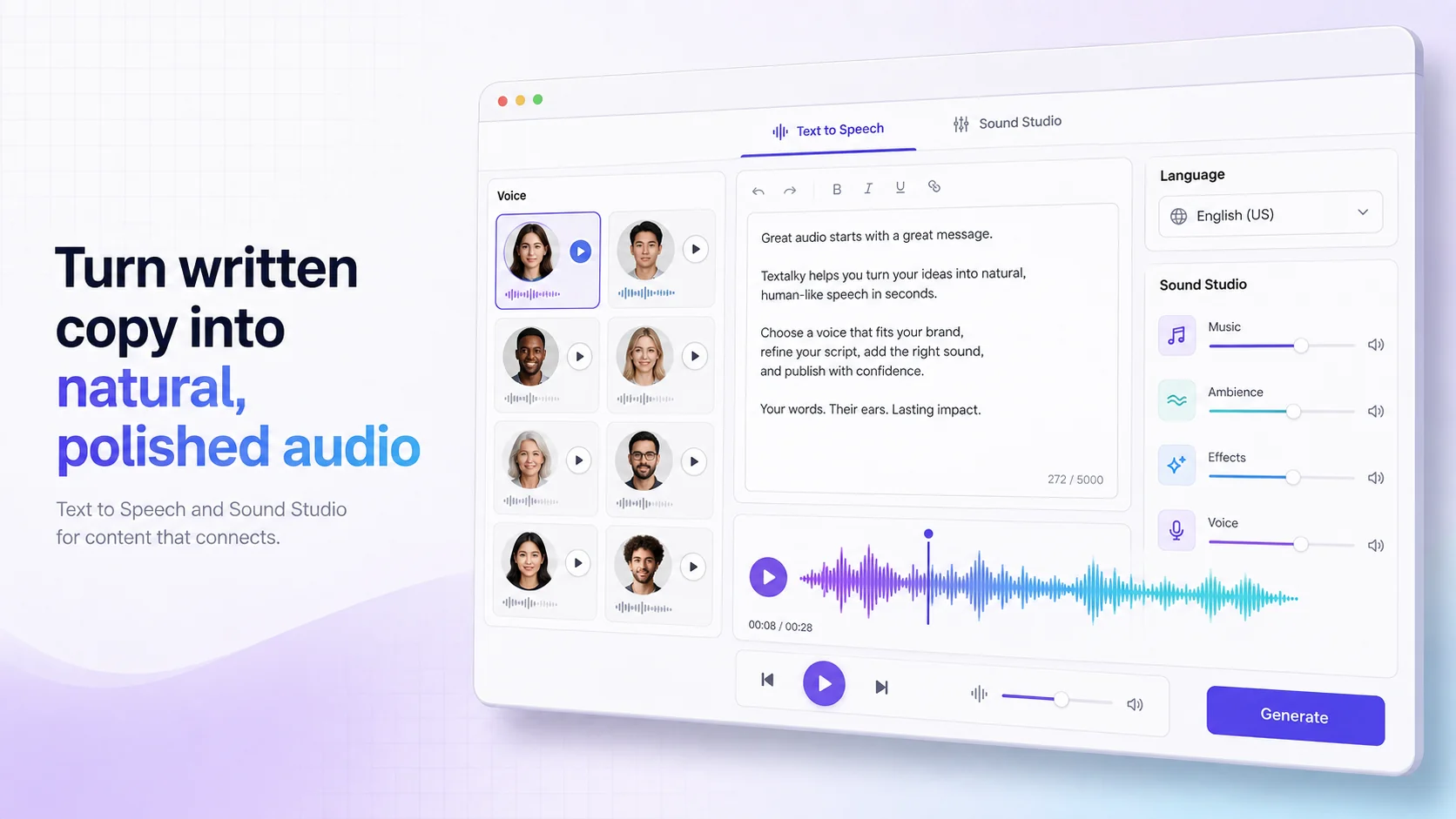
Textalky simplifies the process of generating high-quality text to speech MP3 files with its intuitive interface and powerful AI Voiceover feature. Here’s a step-by-step guide:
- Input Your Text: Begin by accessing the AI Voiceover tool within Textalky. You can paste your script directly into the provided text editor or upload a document.
- Select Your Voice: Browse the extensive library of AI voices. With over 50 studio-grade voices and support for 150+ languages and accents, you’re sure to find the perfect fit for your project. You can often preview voices to hear how they sound before making a selection.
- Adjust Parameters: Fine-tune your audio by adjusting parameters such as speech rate, pitch, and volume. Some tools also allow for SSML (Speech Synthesis Markup Language) input, giving you granular control over pronunciation, pauses, and emphasis to achieve precise delivery.
- Generate and Export: Once you are satisfied with your selections, generate the audio. Textalky will process your text and create the spoken audio. You can then export the final output as an MP3 file, ready for immediate use.
The entire process is designed to be user-friendly, allowing anyone to create professional audio without needing technical expertise in voice acting or audio engineering.
Enhancing Your AI Voiceovers
While standard AI voice generation is impressive, Textalky offers advanced features to elevate your audio from good to exceptional.
- AI Voice Cloning: For ultimate brand consistency or to recreate a specific voice, AI Voice Cloning allows you to train an AI model on your own voice or a chosen voice actor's recordings. This enables you to generate narration that is uniquely yours, ensuring an unmistakable brand identity.
- Sound Studio: Achieving studio-quality sound often requires post-production editing. Textalky’s Sound Studio provides tools to edit, merge, mix, and master your AI-generated audio. You can fine-tune levels, add background music, and ensure a polished final product.
- Voice Isolator: Background noise can detract from even the best voiceover. The Voice Isolator feature uses AI to remove unwanted ambient sounds, such as room echo, hums, or other distractions, leaving you with clean, crisp audio.
By combining these features, you can produce voiceovers that are not only professionally narrated but also expertly produced and free from common audio imperfections.
Use Cases for AI Text to Speech MP3s
The versatility of AI text to speech MP3 generation opens up a world of possibilities across various industries.
- E-Learning Narration: Create engaging audio for online courses and training modules with clear, consistent narration. Textalky’s tools are perfect for developing e-learning narration that keeps students focused and informed.
- Podcast Episodes: Produce professional-sounding intros, outros, or even entire podcast episodes. Whether you're launching new podcast episodes or adding narration to existing content, AI TTS can help.
- Audiobook Production: For authors and independent publishers, AI TTS offers an accessible way to turn manuscripts into audiobooks, significantly reducing production costs and time.
- Marketing and Ad Voiceovers: Craft compelling marketing and ad voiceovers for commercials, social media campaigns, and promotional videos. The ability to quickly generate multiple takes or variations can streamline campaign development.
- Video Narration: Add professional narration to explainer videos, documentaries, corporate videos, and YouTube content. High-quality audio significantly enhances viewer experience.
- Accessibility Tools: Generate audio versions of websites, articles, and documents to make information accessible to a broader audience, including those with visual impairments.
- Internal Communications: Create audio versions of company reports, memos, or training materials for employees, especially for remote teams.
- Personal Use: Convert emails, articles, or even novels into audio for convenient listening on the go.
The applications are limited only by your imagination.
Choosing the Right Text to Speech Solution
When selecting a text to speech solution, it’s important to consider the overall value and efficiency. Many creators find themselves subscribing to multiple separate tools for writing, voiceover, image generation, and video editing. This can lead to increased costs and a fragmented workflow.
An all-in-one AI creative studio like Textalky consolidates all these essential creative tools into a single platform. Instead of juggling multiple subscriptions and interfaces, you get a unified experience with all your AI creative needs met under one roof. This not only streamlines your workflow but also offers significant cost savings compared to purchasing individual tools.
Textalky provides various plan options to suit different needs, from a free tier for basic use to advanced plans offering extensive features and higher quotas. For those looking for the ultimate value and comprehensive access, the AI Lifetime Pro deal offers lifetime access to the full studio for a single, one-time payment. This eliminates recurring monthly or annual fees and provides a cost-effective path to professional AI-powered content creation.
Frequently Asked Questions
How do I convert text to an MP3 audio file using AI?
You can convert text to an MP3 audio file using an AI-powered platform like Textalky. Simply access the AI Voiceover tool, paste your text, select a voice from the available options, adjust any desired parameters like speech rate or pitch, and then generate and export the audio as an MP3 file.
What are the benefits of using AI for text to speech compared to traditional methods?
AI for text to speech offers significant benefits over traditional methods such as hiring voice actors or using basic TTS software. These include lower costs, much faster generation times, consistent voice quality, a wide range of language and accent options, and the ability to easily make edits or generate multiple versions. Traditional methods can be expensive, time-consuming, and may suffer from inconsistencies. Basic TTS often sounds robotic and unengaging.
Can I create custom voices for my text to speech MP3s?
Yes, many advanced AI platforms, including Textalky, offer AI Voice Cloning capabilities. This feature allows you to train an AI model on existing voice recordings to create a unique, custom voice for your text to speech MP3s. This is ideal for maintaining brand consistency or replicating a specific vocal style.
Your Next Step in AI Audio Creation
If you're tired of the limitations and costs associated with traditional voiceover production or juggling multiple single-purpose tools, it’s time to explore the power of an integrated AI creative studio. Textalky provides a comprehensive suite of AI tools, including best-in-class text to speech generation, all within a single, user-friendly platform.
To experience the full potential of AI-powered audio and unlock all the creative tools Textalky has to offer, consider the AI Lifetime Pro deal. For a one-time payment of $79, you gain lifetime access to the complete Textalky studio, covering all your creative needs from voiceovers and writing to image and video generation. This offer is available for a limited time, so don’t miss out on this exceptional opportunity to elevate your content creation workflow.
Explore the AI Lifetime Pro deal today and start generating professional, engaging text to speech MP3 files and so much more.
Ready to try it yourself?
Create a free Textalky account - no credit card required - and put this into practice.
Start creating for free